Sunday, July 9, 2017
Oracle Database Vault - Part 3 ( Build Database Control )
Posted by MOHAMMED ABDUL HAMEED on 8:59 AM
Oracle Database Vault - Part 2 ( Enable Oracle Database Vault by relinking )
Posted by MOHAMMED ABDUL HAMEED on 8:41 AM
We need to stop the Listener,database,database control and then enable the oracle database vault.
[oracle@india ~]$ . oraenv
ORACLE_SID = [Stage] ?
The Oracle base for ORACLE_HOME=/u01/app/oracle/oracle11g/product/11.2.0.4/dbhome_2 is /u01/app/oracle
[oracle@india ~]$ lsnrctl stop
[oracle@india ~]$ sqlplus / as sysdba
SQL>shutdown immediate;
[oracle@india ~]$ emctl stop dbconsole
# Enable the oracle database vault.
[oracle@india ~]$ cd $ORACLE_HOME/rdbms/lib
[oracle@india ~]$ make -f ins rdbms.mk dv on lbac on ioracle
# Start the Database and Listener.
Sql>startup;
[oracle@india ~]$ lsnrctl start
[oracle@india ~]$ . oraenv
ORACLE_SID = [Stage] ?
The Oracle base for ORACLE_HOME=/u01/app/oracle/oracle11g/product/11.2.0.4/dbhome_2 is /u01/app/oracle
[oracle@india ~]$ lsnrctl stop
[oracle@india ~]$ sqlplus / as sysdba
SQL>shutdown immediate;
[oracle@india ~]$ emctl stop dbconsole
# Enable the oracle database vault.
[oracle@india ~]$ cd $ORACLE_HOME/rdbms/lib
[oracle@india ~]$ make -f ins rdbms.mk dv on lbac on ioracle
# Start the Database and Listener.
Sql>startup;
[oracle@india ~]$ lsnrctl start
Saturday, July 8, 2017
Oracle Database Vault :
The Traditional Standards guards the database by using the firewall, but majority of the security breaches are reported with in the organization by using the high privileged user such as DBA , IT Admin.
Oracle delivers the first and only privileged database user access control solution,"Oracle Database Vault ".
It is delivered by using the separation of duty and highly flexible control access policies such as Realms,factors and command rules.
Realms : It is defined as boundary or protection zone around application data.
Factor & Command Rule : It work together to control the access of Database.
The Traditional Standards guards the database by using the firewall, but majority of the security breaches are reported with in the organization by using the high privileged user such as DBA , IT Admin.
Oracle delivers the first and only privileged database user access control solution,"Oracle Database Vault ".
It is delivered by using the separation of duty and highly flexible control access policies such as Realms,factors and command rules.
Realms : It is defined as boundary or protection zone around application data.
Factor & Command Rule : It work together to control the access of Database.
# Current Running SQL Queries
select
b.sid,b.status,b.last_call_et,b.program,c.sql_id,c.sql_text
from v$session b,v$sqlarea c
where b.sql_id=c.sql_id;
# Latest Running SQL Queries
select inst_id,sample_time,session_id,session_serial#,sql_id
from gv$active_session_history
where sql_id is not null
order by 1 desc;
# SQL Queries Running for Long Time
alter session set nls_date_format = 'dd/mm/yyyy hh24:mi';
select sid
,opname
,target
,round(sofar/totalwork*100,2) as
percent_done
,start_time
,last_update_time
,time_remaining
from
v$session_longops;
# Active Sessions running for more than 1 hour
SELECT USERNAME,machine,inst_id,sid,serial#,PROGRAM,
to_char(logon_time,'dd-mm-yy hh:mi:ss AM')"Logon
Time",
ROUND((SYSDATE-LOGON_TIME)*(24*60),1) as MINUTES_LOGGED_ON,
ROUND(LAST_CALL_ET/60,1) as Minutes_FOR_CURRENT_SQL
From gv$session
WHERE STATUS='ACTIVE'
AND USERNAME IS NOT NULL and
ROUND((SYSDATE-LOGON_TIME)*(24*60),1) > 60
ORDER BY MINUTES_LOGGED_ON DESC;
# Session details with SID and Event waiting
# Inactive Sessions for more than 1 hour
SELECT USERNAME,machine,inst_id,sid,serial#,PROGRAM,
to_char(logon_time,'dd-mm-yy hh:mi:ss AM')"Logon Time",
ROUND((SYSDATE-LOGON_TIME)*(24*60),1) as MINUTES_LOGGED_ON,
ROUND(LAST_CALL_ET/60,1) as Minutes_FOR_CURRENT_SQL
From gv$session
WHERE STATUS='INACTIVE'
AND USERNAME IS NOT NULL and ROUND((SYSDATE-LOGON_TIME)*(24*60),1) > 60
ORDER BY MINUTES_LOGGED_ON DESC;
select a.sid, a.serial#, a.status, a.program,
b.event,to_char(a.logon_time, 'dd-mon-yy hh24:mi') LOGON_TIME,to_char(Sysdate,
'dd-mon-yy-hh24:mi') CURRENT_TIME, (a.last_call_et/3600) "Hrs
connected" from v$session a,v$session_wait b where a.sid in(&SIDs) and
a.sid=b.sid order by 8;
# Count of Session and Processes
select count(*) from v$session;
select count(*) from v$process;
select (select count(*) from v$session) sessions, (select
count(*) from v$process) processes from dual;
# To list inactive Sessions from username
SELECT username,count(*) num_inv_sess
FROM v$session
where last_call_et > 3600
and username is not null
AND STATUS='INACTIVE'
group by username
order by num_inv_sess DESC;
SELECT count(*) FROM v$session where last_call_et > 43200
and username is not null AND
STATUS='INACTIVE';
SELECT count(*) FROM v$session where last_call_et > 3600
and username is not null AND
STATUS='INACTIVE';
Saturday, May 27, 2017
On the Standby :
select name,value from gv$parameter where name in ('db_name','db_unique_name','db_domain','db_file_name_convert','log_file_name_convert','fal_server','fal_client','remote_login_passwordfile','standby_file_management','dg_broker_start','dg_broker_config_file1','dg_broker_config_file2');

select status,instance_name,database_role,open_mode,protection_mode,switchover_status from gv$instance,gv$database;
select name,(space_limit/1024/1024/1024) "Limit in GB",(space_used/1024/1024/1024) "Used in GB" from v$recovery_file_dest;
select thread#,max(sequence#) from gv$archived_log group by thread#;
select thread#,max(sequence#) from gv$archived_log where applied='YES' group by thread#;
select dest_id, dest_name, status, target, archiver , destination from GV$ARCHIVE_DEST where destination IS NOT NULL;
select inst_id,process,status,sequence#,thread#,client_process from gv$managed_standby;
On the Primary :
select name,value from gv$parameter where name in ('db_name','db_unique_name','db_domain','db_file_name_convert','log_file_name_convert','fal_server','fal_client','remote_login_passwordfile','standby_file_management','dg_broker_start','dg_broker_config_file1','dg_broker_config_file2');
select status,instance_name,database_role,open_mode,protection_mode,switchover_status from gv$instance,gv$database;
select name,(space_limit/1024/1024/1024) "Limit in GB",(space_used/1024/1024/1024) "Used in GB" from v$recovery_file_dest;
select thread#,max(sequence#) from gv$archived_log group by thread#;
select inst_id,dest_id, dest_name, status, target, archiver , destination from GV$ARCHIVE_DEST where destination IS NOT NULL;
select * from (select severity,error_code,message,to_char(timestamp,'DD-MON-YYYY HH24:MI:SS') from v$dataguard_status where dest_id=2 order by rownum DESC) where rownum <= 7;
select name,value from gv$parameter where name in ('db_name','db_unique_name','db_domain','db_file_name_convert','log_file_name_convert','fal_server','fal_client','remote_login_passwordfile','standby_file_management','dg_broker_start','dg_broker_config_file1','dg_broker_config_file2');
select status,instance_name,database_role,open_mode,protection_mode,switchover_status from gv$instance,gv$database;
select name,(space_limit/1024/1024/1024) "Limit in GB",(space_used/1024/1024/1024) "Used in GB" from v$recovery_file_dest;
select thread#,max(sequence#) from gv$archived_log group by thread#;
select inst_id,dest_id, dest_name, status, target, archiver , destination from GV$ARCHIVE_DEST where destination IS NOT NULL;
select * from (select severity,error_code,message,to_char(timestamp,'DD-MON-YYYY HH24:MI:SS') from v$dataguard_status where dest_id=2 order by rownum DESC) where rownum <= 7;
Monday, May 15, 2017
Basic syntax :
scp source_file_name username@destination_host:destination_folder
Specify specific port(3301) to use with scp :
scp -P 3301 fullimp15may2017.dmp username@destination_host
password : *********
Note : " P " is capital letter
scp source_file_name username@destination_host:destination_folder
Specify specific port(3301) to use with scp :
scp -P 3301 fullimp15may2017.dmp username@destination_host
password : *********
Note : " P " is capital letter
[oracle@india ~]$ expdp directory=DATA_PUMP_DIR dumpfile=hameed.dmp logfile=hameed.log schemas=hameed encryption=all encryption_password=oracle encryption_algorithm=AES256 ENCRYPTION_MODE=password
Export: Release 11.2.0.4.0 - Production on Sun May 14 13:25:54 2017
Copyright (c) 1982, 2011, Oracle and/or its affiliates. All rights reserved.
Username: / as sysdba
Connected to: Oracle Database 11g Enterprise Edition Release 11.2.0.4.0 - Production
With the Partitioning, OLAP, Data Mining and Real Application Testing options
Starting "SYS"."SYS_EXPORT_SCHEMA_01": /******** AS SYSDBA directory=DATA_PUMP_DIR dumpfile=hameed.dmp logfile=hameed.log schemas=hameed encryption=all encryption_password=******** encryption_algorithm=AES256 ENCRYPTION_MODE=password
Estimate in progress using BLOCKS method...
Processing object type SCHEMA_EXPORT/TABLE/TABLE_DATA
Total estimation using BLOCKS method: 64 KB
Processing object type SCHEMA_EXPORT/USER
Processing object type SCHEMA_EXPORT/SYSTEM_GRANT
Processing object type SCHEMA_EXPORT/ROLE_GRANT
Processing object type SCHEMA_EXPORT/DEFAULT_ROLE
Processing object type SCHEMA_EXPORT/PRE_SCHEMA/PROCACT_SCHEMA
Processing object type SCHEMA_EXPORT/TABLE/TABLE
. . exported "HAMEED"."INFO" 5.835 KB 1 rows
Master table "SYS"."SYS_EXPORT_SCHEMA_01" successfully loaded/unloaded
******************************************************************************
Dump file set for SYS.SYS_EXPORT_SCHEMA_01 is:
/u01/app/oracle/admin/Stage/dpdump/hameed.dmp
Job "SYS"."SYS_EXPORT_SCHEMA_01" successfully completed at Sun May 14 13:27:32 2017 elapsed 0 00:01:13
[oracle@india ~]$ impdp directory=DATA_PUMP_DIR dumpfile= hameed.dmp logfile=hameedimp.log remap_schema=hameed:abdul
Import: Release 11.2.0.4.0 - Production on Sun May 14 13:33:31 2017
Copyright (c) 1982, 2011, Oracle and/or its affiliates. All rights reserved.
Username: / as sysdba
Connected to: Oracle Database 11g Enterprise Edition Release 11.2.0.4.0 - Production
With the Partitioning, OLAP, Data Mining and Real Application Testing options
ORA-39002: invalid operation
ORA-39174: Encryption password must be supplied.
[oracle@india ~]$ impdp directory=DATA_PUMP_DIR dumpfile= hameed.dmp logfile=hameedimp.log remap_schema=hameed:abdul encryption_password=oracl
Import: Release 11.2.0.4.0 - Production on Sun May 14 13:36:17 2017
Copyright (c) 1982, 2011, Oracle and/or its affiliates. All rights reserved.
Username: / as sysdba
Connected to: Oracle Database 11g Enterprise Edition Release 11.2.0.4.0 - Production
With the Partitioning, OLAP, Data Mining and Real Application Testing options
ORA-39002: invalid operation
ORA-39176: Encryption password is incorrect.
[oracle@india ~]$ impdp directory=DATA_PUMP_DIR dumpfile= hameed.dmp logfile=hameedimp.log remap_schema=hameed:abdul encryption_password=oracle
Import: Release 11.2.0.4.0 - Production on Sun May 14 13:35:42 2017
Copyright (c) 1982, 2011, Oracle and/or its affiliates. All rights reserved.
Username: / as sysdba
Connected to: Oracle Database 11g Enterprise Edition Release 11.2.0.4.0 - Production
With the Partitioning, OLAP, Data Mining and Real Application Testing options
Master table "SYS"."SYS_IMPORT_FULL_01" successfully loaded/unloaded
Starting "SYS"."SYS_IMPORT_FULL_01": /******** AS SYSDBA directory=DATA_PUMP_DIR dumpfile= logfile=hameedimp.log remap_schema=hameed:abdul encryption_password=********
Processing object type SCHEMA_EXPORT/USER
ORA-31684: Object type USER:"ABDUL" already exists
Processing object type SCHEMA_EXPORT/SYSTEM_GRANT
Processing object type SCHEMA_EXPORT/ROLE_GRANT
Processing object type SCHEMA_EXPORT/DEFAULT_ROLE
Processing object type SCHEMA_EXPORT/PRE_SCHEMA/PROCACT_SCHEMA
Processing object type SCHEMA_EXPORT/TABLE/TABLE
Processing object type SCHEMA_EXPORT/TABLE/TABLE_DATA
. . imported "ABDUL"."INFO" 5.835 KB 1 rows
Job "SYS"."SYS_IMPORT_FULL_01" completed with 1 error(s) at Sun May 14 13:35:53 2017 elapsed 0 00:00:07
Export: Release 11.2.0.4.0 - Production on Sun May 14 13:25:54 2017
Copyright (c) 1982, 2011, Oracle and/or its affiliates. All rights reserved.
Username: / as sysdba
Connected to: Oracle Database 11g Enterprise Edition Release 11.2.0.4.0 - Production
With the Partitioning, OLAP, Data Mining and Real Application Testing options
Starting "SYS"."SYS_EXPORT_SCHEMA_01": /******** AS SYSDBA directory=DATA_PUMP_DIR dumpfile=hameed.dmp logfile=hameed.log schemas=hameed encryption=all encryption_password=******** encryption_algorithm=AES256 ENCRYPTION_MODE=password
Estimate in progress using BLOCKS method...
Processing object type SCHEMA_EXPORT/TABLE/TABLE_DATA
Total estimation using BLOCKS method: 64 KB
Processing object type SCHEMA_EXPORT/USER
Processing object type SCHEMA_EXPORT/SYSTEM_GRANT
Processing object type SCHEMA_EXPORT/ROLE_GRANT
Processing object type SCHEMA_EXPORT/DEFAULT_ROLE
Processing object type SCHEMA_EXPORT/PRE_SCHEMA/PROCACT_SCHEMA
Processing object type SCHEMA_EXPORT/TABLE/TABLE
. . exported "HAMEED"."INFO" 5.835 KB 1 rows
Master table "SYS"."SYS_EXPORT_SCHEMA_01" successfully loaded/unloaded
******************************************************************************
Dump file set for SYS.SYS_EXPORT_SCHEMA_01 is:
/u01/app/oracle/admin/Stage/dpdump/hameed.dmp
Job "SYS"."SYS_EXPORT_SCHEMA_01" successfully completed at Sun May 14 13:27:32 2017 elapsed 0 00:01:13
[oracle@india ~]$ impdp directory=DATA_PUMP_DIR dumpfile= hameed.dmp logfile=hameedimp.log remap_schema=hameed:abdul
Import: Release 11.2.0.4.0 - Production on Sun May 14 13:33:31 2017
Copyright (c) 1982, 2011, Oracle and/or its affiliates. All rights reserved.
Username: / as sysdba
Connected to: Oracle Database 11g Enterprise Edition Release 11.2.0.4.0 - Production
With the Partitioning, OLAP, Data Mining and Real Application Testing options
ORA-39002: invalid operation
ORA-39174: Encryption password must be supplied.
[oracle@india ~]$ impdp directory=DATA_PUMP_DIR dumpfile= hameed.dmp logfile=hameedimp.log remap_schema=hameed:abdul encryption_password=oracl
Import: Release 11.2.0.4.0 - Production on Sun May 14 13:36:17 2017
Copyright (c) 1982, 2011, Oracle and/or its affiliates. All rights reserved.
Username: / as sysdba
Connected to: Oracle Database 11g Enterprise Edition Release 11.2.0.4.0 - Production
With the Partitioning, OLAP, Data Mining and Real Application Testing options
ORA-39002: invalid operation
ORA-39176: Encryption password is incorrect.
[oracle@india ~]$ impdp directory=DATA_PUMP_DIR dumpfile= hameed.dmp logfile=hameedimp.log remap_schema=hameed:abdul encryption_password=oracle
Import: Release 11.2.0.4.0 - Production on Sun May 14 13:35:42 2017
Copyright (c) 1982, 2011, Oracle and/or its affiliates. All rights reserved.
Username: / as sysdba
Connected to: Oracle Database 11g Enterprise Edition Release 11.2.0.4.0 - Production
With the Partitioning, OLAP, Data Mining and Real Application Testing options
Master table "SYS"."SYS_IMPORT_FULL_01" successfully loaded/unloaded
Starting "SYS"."SYS_IMPORT_FULL_01": /******** AS SYSDBA directory=DATA_PUMP_DIR dumpfile= logfile=hameedimp.log remap_schema=hameed:abdul encryption_password=********
Processing object type SCHEMA_EXPORT/USER
ORA-31684: Object type USER:"ABDUL" already exists
Processing object type SCHEMA_EXPORT/SYSTEM_GRANT
Processing object type SCHEMA_EXPORT/ROLE_GRANT
Processing object type SCHEMA_EXPORT/DEFAULT_ROLE
Processing object type SCHEMA_EXPORT/PRE_SCHEMA/PROCACT_SCHEMA
Processing object type SCHEMA_EXPORT/TABLE/TABLE
Processing object type SCHEMA_EXPORT/TABLE/TABLE_DATA
. . imported "ABDUL"."INFO" 5.835 KB 1 rows
Job "SYS"."SYS_IMPORT_FULL_01" completed with 1 error(s) at Sun May 14 13:35:53 2017 elapsed 0 00:00:07
Tuesday, April 25, 2017
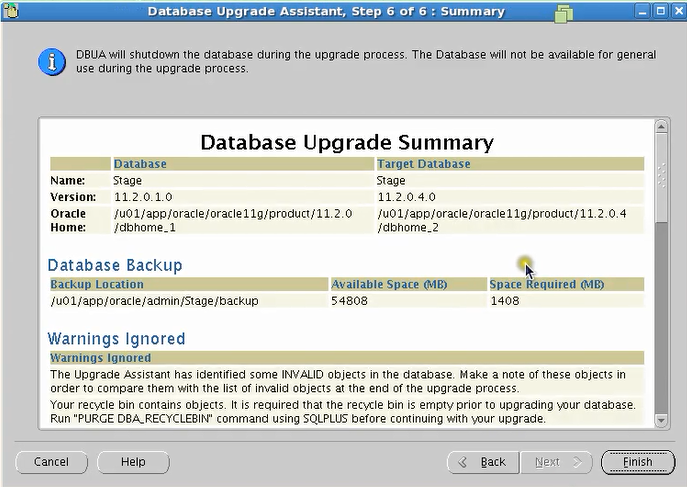
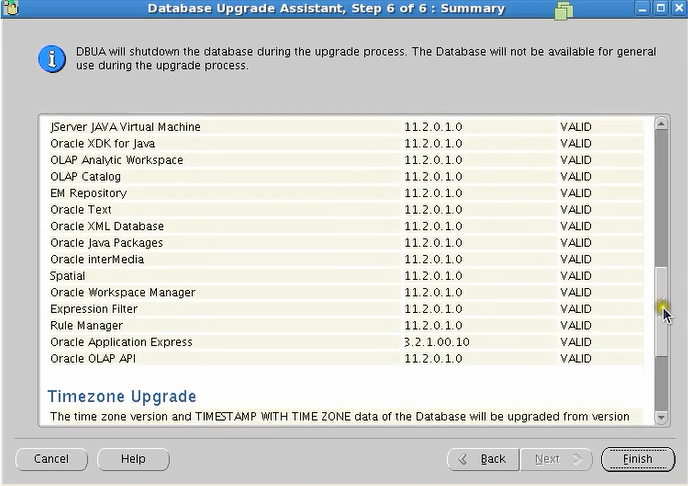
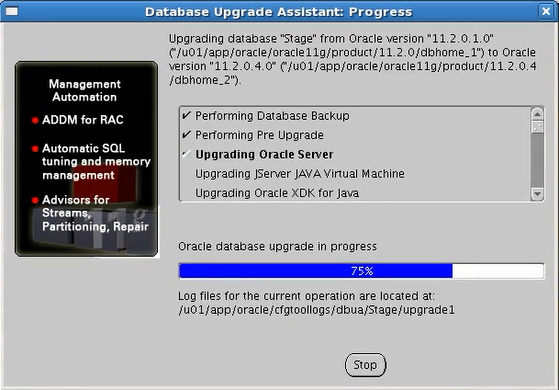
Oracle Database Upgrade from 11.2.0.1 to 11.2.0.4 Step by Step
Posted by MOHAMMED ABDUL HAMEED on 1:47 PM
** Find the date of the particular day **
[root@india ~]# date
Tue Apr 25 15:39:24 EDT 2017
** Find the release no **
[root@india ~]# cat /etc/oracle-release
Oracle Linux Server release 5.8
** Find the Kernal Parameter **
[root@india ~]# uname -r
2.6.32-300.10.1.el5uek
** Find the 32 or 64 bit **
[root@india ~]# uname -p
x86_64
** Find the no of Database in one partiuclar Server **
[oracle@india ~]$ cat /etc/oratab
#
# This file is used by ORACLE utilities. It is created by root.sh
# and updated by the Database Configuration Assistant when creating
# a database.
# A colon, ':', is used as the field terminator. A new line terminates
# the entry. Lines beginning with a pound sign, '#', are comments.
#
# Entries are of the form:
# $ORACLE_SID:$ORACLE_HOME::
#
# The first and second fields are the system identifier and home
# directory of the database respectively. The third filed indicates
# to the dbstart utility that the database should , "Y", or should not,
# "N", be brought up at system boot time.
#
# Multiple entries with the same $ORACLE_SID are not allowed.
#
#
Stage:/u01/app/oracle/oracle11g/product/11.2.0/dbhome_1:N
12.1.0.2.0
2.1.0.6.0
** Now Export the new Oracle Home **
** Install the Binaries of 11.2.0.4 **
[oracle@india ~]$ sqlplus / as sysdba
SQL*Plus: Release 11.2.0.4.0 Production on Wed May 3 14:32:18 2017
Copyright (c) 1982, 2013, Oracle. All rights reserved.
Connected to:
Oracle Database 11g Enterprise Edition Release 11.2.0.4.0 - Production
With the Partitioning, OLAP, Data Mining and Real Application Testing options
SQL> set linesize 500;
SQL> select instance_name,host_name,version,status from v$instance;
INSTANCE_NAME HOST_NAME VERSION STATUS
---------------- ---------------------------------------------------------------- ----------------- ------------
Stage india 11.2.0.4.0 OPEN
SQL> select comp_name,version,status from dba_registry;
COMP_NAME VERSION STATUS
--------------------------------------------------------------------------------------------------------------------------------------------------------------------------------------------------------------------------------------------------------------- ------------------------------ -----------
OWB 11.2.0.1.0 VALID
Oracle Application Express 3.2.1.00.10 VALID
Oracle Enterprise Manager 11.2.0.4.0 VALID
OLAP Catalog 11.2.0.4.0 VALID
Spatial 11.2.0.4.0 VALID
Oracle Multimedia 11.2.0.4.0 VALID
Oracle XML Database 11.2.0.4.0 VALID
Oracle Text 11.2.0.4.0 VALID
Oracle Expression Filter 11.2.0.4.0 VALID
Oracle Rules Manager 11.2.0.4.0 VALID
Oracle Workspace Manager 11.2.0.4.0 VALID
COMP_NAME VERSION STATUS
--------------------------------------------------------------------------------------------------------------------------------------------------------------------------------------------------------------------------------------------------------------- ------------------------------ -----------
Oracle Database Catalog Views 11.2.0.4.0 VALID
Oracle Database Packages and Types 11.2.0.4.0 VALID
JServer JAVA Virtual Machine 11.2.0.4.0 VALID
Oracle XDK 11.2.0.4.0 VALID
Oracle Database Java Packages 11.2.0.4.0 VALID
OLAP Analytic Workspace 11.2.0.4.0 VALID
Oracle OLAP API 11.2.0.4.0 VALID
18 rows selected.
[root@india ~]# date
Tue Apr 25 15:39:24 EDT 2017
** Find the release no **
[root@india ~]# cat /etc/oracle-release
Oracle Linux Server release 5.8
** Find the Kernal Parameter **
[root@india ~]# uname -r
2.6.32-300.10.1.el5uek
** Find the 32 or 64 bit **
[root@india ~]# uname -p
x86_64
** Find the no of Database in one partiuclar Server **
[oracle@india ~]$ cat /etc/oratab
#
# This file is used by ORACLE utilities. It is created by root.sh
# and updated by the Database Configuration Assistant when creating
# a database.
# A colon, ':', is used as the field terminator. A new line terminates
# the entry. Lines beginning with a pound sign, '#', are comments.
#
# Entries are of the form:
# $ORACLE_SID:$ORACLE_HOME:
#
# The first and second fields are the system identifier and home
# directory of the database respectively. The third filed indicates
# to the dbstart utility that the database should , "Y", or should not,
# "N", be brought up at system boot time.
#
# Multiple entries with the same $ORACLE_SID are not allowed.
#
#
Stage:/u01/app/oracle/oracle11g/product/11.2.0/dbhome_1:N
** Find the Oracle Inventory location and group **
[oracle@india ~]$ cat /u01/app/oracle/oracle11g/product/11.2.0/dbhome_1/oraInst.loc
inventory_loc=/u01/app/oraInventory
inst_group=oinstall
** Find the all ORACLE_HOME Locations **
[oracle@india ~]$ cat /u01/app/oraInventory/ContentsXML/inventory.xml
** To Check which instance is wokring **
[oracle@india ~]$ ps -ef | grep -i smon
oracle 12566 1 0 08:23 ? 00:00:04 ora_smon_HYD
oracle 16275 1 0 09:56 ? 00:00:03 ora_smon_PROD
oracle 25916 1 0 14:04 ? 00:00:15 ora_smon_Stage
oracle 30710 30125 0 15:56 pts/10 00:00:00 grep -i smon
** To Connect to Stage database **
[oracle@india ~]$ . oraenv
ORACLE_SID = [oracle] ? Stage
The Oracle base for ORACLE_HOME=/u01/app/oracle/oracle11g/product/11.2.0/dbhome_1 is /u01/app/oracle
** Check the version **
SQL> select instance_name,host_name,version,status from v$instance;
INSTANCE_NAME HOST_NAME VERSION STATUS
------------------------ -------------------------------------------------- ----------------- ------------
Stage india 11.2.0.1.0 OPEN
SQL> select comp_name,version,status from dba_registry;
COMP_NAME VERSION STATUS
--------------------------------------------------------------------------------------------------------------------------------------------------------------------------------------------------------------------------------------------------------------- ------------------------------ -----------
OWB 11.2.0.1.0 VALID
Oracle Application Express 3.2.1.00.10 VALID
Oracle Enterprise Manager 11.2.0.1.0 VALID
OLAP Catalog 11.2.0.1.0 VALID
Spatial 11.2.0.1.0 VALID
Oracle Multimedia 11.2.0.1.0 VALID
Oracle XML Database 11.2.0.1.0 VALID
Oracle Text 11.2.0.1.0 VALID
Oracle Expression Filter 11.2.0.1.0 VALID
Oracle Rules Manager 11.2.0.1.0 VALID
Oracle Workspace Manager 11.2.0.1.0 VALID
COMP_NAME VERSION STATUS
--------------------------------------------------------------------------------------------------------------------------------------------------------------------------------------------------------------------------------------------------------------- ------------------------------ -----------
Oracle Database Catalog Views 11.2.0.1.0 VALID
Oracle Database Packages and Types 11.2.0.1.0 VALID
JServer JAVA Virtual Machine 11.2.0.1.0 VALID
Oracle XDK 11.2.0.1.0 VALID
Oracle Database Java Packages 11.2.0.1.0 VALID
OLAP Analytic Workspace 11.2.0.1.0 VALID
Oracle OLAP API 11.2.0.1.0 VALID
18 rows selected.
** Check the 11.2.0.4 software binaries **
[oracle@india neupgrade]$ ls
p13390677_112040_LINUX_1of7 (1).zip p13390677_112040_LINUX_2of7.zip
p13390677_112040_LINUX_1of7.zip
[oracle@india neupgrade]$ pwd
/mnt/hgfs/neupgrade
[oracle@india neupgrade]$ unzip /mnt/hgfs/neupgrade/p13390677_112040_LINUX_1of7 -d /u01/app/oracle/oracle11g/product/11.2.0.4/dbhome_2/
[oracle@india neupgrade]$ unzip /mnt/hgfs/neupgrade/p13390677_112040_LINUX_2of7 -d /u01/app/oracle/oracle11g/product/11.2.0.4/dbhome_2/
** Now Export the new Oracle Home **
[oracle@india database]$ export ORACLE_HOME=/u01/app/oracle/oracle11g/product/11.2.0.4/dbhome_2
** Install the Binaries of 11.2.0.4 **
[oracle@india database]$ ./runInstaller
Starting Oracle Universal Installer...
@90 % it will prompt to run the root.sh script
select Y for all to replace the current files with the new files.
[oracle@india ~]$ sqlplus / as sysdba
SQL*Plus: Release 11.2.0.4.0 Production on Wed May 3 14:32:18 2017
Copyright (c) 1982, 2013, Oracle. All rights reserved.
Connected to:
Oracle Database 11g Enterprise Edition Release 11.2.0.4.0 - Production
With the Partitioning, OLAP, Data Mining and Real Application Testing options
SQL> set linesize 500;
SQL> select instance_name,host_name,version,status from v$instance;
INSTANCE_NAME HOST_NAME VERSION STATUS
---------------- ---------------------------------------------------------------- ----------------- ------------
Stage india 11.2.0.4.0 OPEN
SQL> select comp_name,version,status from dba_registry;
COMP_NAME VERSION STATUS
--------------------------------------------------------------------------------------------------------------------------------------------------------------------------------------------------------------------------------------------------------------- ------------------------------ -----------
OWB 11.2.0.1.0 VALID
Oracle Application Express 3.2.1.00.10 VALID
Oracle Enterprise Manager 11.2.0.4.0 VALID
OLAP Catalog 11.2.0.4.0 VALID
Spatial 11.2.0.4.0 VALID
Oracle Multimedia 11.2.0.4.0 VALID
Oracle XML Database 11.2.0.4.0 VALID
Oracle Text 11.2.0.4.0 VALID
Oracle Expression Filter 11.2.0.4.0 VALID
Oracle Rules Manager 11.2.0.4.0 VALID
Oracle Workspace Manager 11.2.0.4.0 VALID
COMP_NAME VERSION STATUS
--------------------------------------------------------------------------------------------------------------------------------------------------------------------------------------------------------------------------------------------------------------- ------------------------------ -----------
Oracle Database Catalog Views 11.2.0.4.0 VALID
Oracle Database Packages and Types 11.2.0.4.0 VALID
JServer JAVA Virtual Machine 11.2.0.4.0 VALID
Oracle XDK 11.2.0.4.0 VALID
Oracle Database Java Packages 11.2.0.4.0 VALID
OLAP Analytic Workspace 11.2.0.4.0 VALID
Oracle OLAP API 11.2.0.4.0 VALID
18 rows selected.