Type of Indexes in Oracle - Part 2

on 2:48 PM

B-Tree index :- B-tree is a self-balancing tree data structure that keeps data sorted and allows searches, sequential access, insertions, and deletions in logarithmic time.

This index is default index in oracle, Good for high cardinality (not identical or unique values like usernames, user-ids)

Bitmap index:- Bitmap index is a special kind of database index that uses bitmaps.

Excellent in Data warehouse environments Good for low cardinality values ( Less repeated values ex: Gender)

Function Based index:- Function-based indexes allow you to create an index based on a function or expression. 

Good for columns that have SQL functions applied to them. This can be used with either a B-tree or bitmap index.
           
Concatenate or Composite index: - A database composite index or multi-column index is an index that is based on several columns.

Reverse index:-  A form of B-tree index; useful to balance I/O in an index that has many sequential inserts.

Descending Index:- A form of B-tree index; used with indexes where corresponding column values are sorted in a descending order (the default order is ascending).

Global Partitioned Index:- Global index across all partitions in a partitioned table or regular table. This can be a B-tree index type and can’t be a bitmap index type.

Local Partitioned Index:- Local index based on individual partitions in a partitioned table. This can be either a B-tree or bitmap index type.

Indexes in Oracle - Part 1

on 1:20 PM

An indexes are schema objects that contains an entry for each value that appears in the indexed columns of the table and provides fast access to rows.Index is a database object that makes data retrieval faster.

 We can say Indexes are the easiest way to improve the performance of long running queries with full tables scan. By properly indexing large tables query completion time can go from hours to minutes.

Indexes created on column and that column is called index key.

Indexes not only improve Select queries but also it improves Update & Delete.

Oracle 12.2 New Feature: SQL*Plus History

on 1:17 PM

SQL*Plus History is not enabled by default we need to enable it

Sql > set hist on


We can check the history is enable or not by using the below command :


Sql > show history

history is ON and set to "100"

Note :  The default length of the history is 100.


To change the length of the history we can use :


Sql > set hist 50


Check the History :


Sql > history

2 show history
3 select tablespace_name from dba_tablspaces;
4 select host_name from v$instance;


To run a command from the history use the history run command


Sql > hist 4 run

Host_Name

-----------------
mahameed

Help History :

SQL> help history
HISTORY
-------
Stores, lists, executes, edits of the commands
entered during the current SQL*Plus session.
 HIST[ORY] [N {RUN | EDIT | DEL[ETE]}] | [CLEAR]
N is the entry number listed in the history list.
Use this number to recall, edit or delete the command.
 Example:
HIST 3 RUN - will run the 3rd entry from the list.
HIST[ORY] without any option will list all entries in the list.

Oracle Database Vault - Part 10 ( Granting access by using Realm )

on 4:22 AM

To Allow any specific user to access the table.

To allow the user mahameeditpro to access the table emp.salinfo , the below mention steps need to followed :

Click on the Realm


Select the Realm and select Realm Authorizations -> Click Create


Select the specific user from the Drop down list -> Click "OK"


Now , Lets Login to the database by mahameeditpro and check the access.


Now you can access the particular table by using the specific user , Hope its helpful. 

Oracle Database Vault - Part 9 ( Creating a Realm)

on 2:08 AM

Realms : It is defined as boundary or protection zone around application data.


Click on "Create" and provide the appropriate Name and Description.


Click "Ok"-> Select new "Realm" and Click on "Edit" . 


Use the drop-down list to select the owner,object type and enter the object name.

To restrict access to an entire schema,leave the " % " in the object name field.


Click ok 

Now , if we try to query then it will return ORA-01031: insufficient privileges


Oracle Database Vault - Part 8 ( Assigning the Rule sets)

on 2:06 PM

By creating the Rule Set , we can unable the functionality of the SYS User.

Steps : Login to Database Vault Page.

Select Rule Sets


Click on Create


Provide the name as : SYS_ADMIN_USER -> OK

Select from List " SYS_ADMIN_USER" and click on edit


Scroll down to " Rules Associated to the Rule Set" and Click on "Create"


Use the name “SYS_ADMIN_USER”
Enter this in the expression  field – dvf.f$session_user = ‘SYS’


Click on OK to save it, then on OK again.


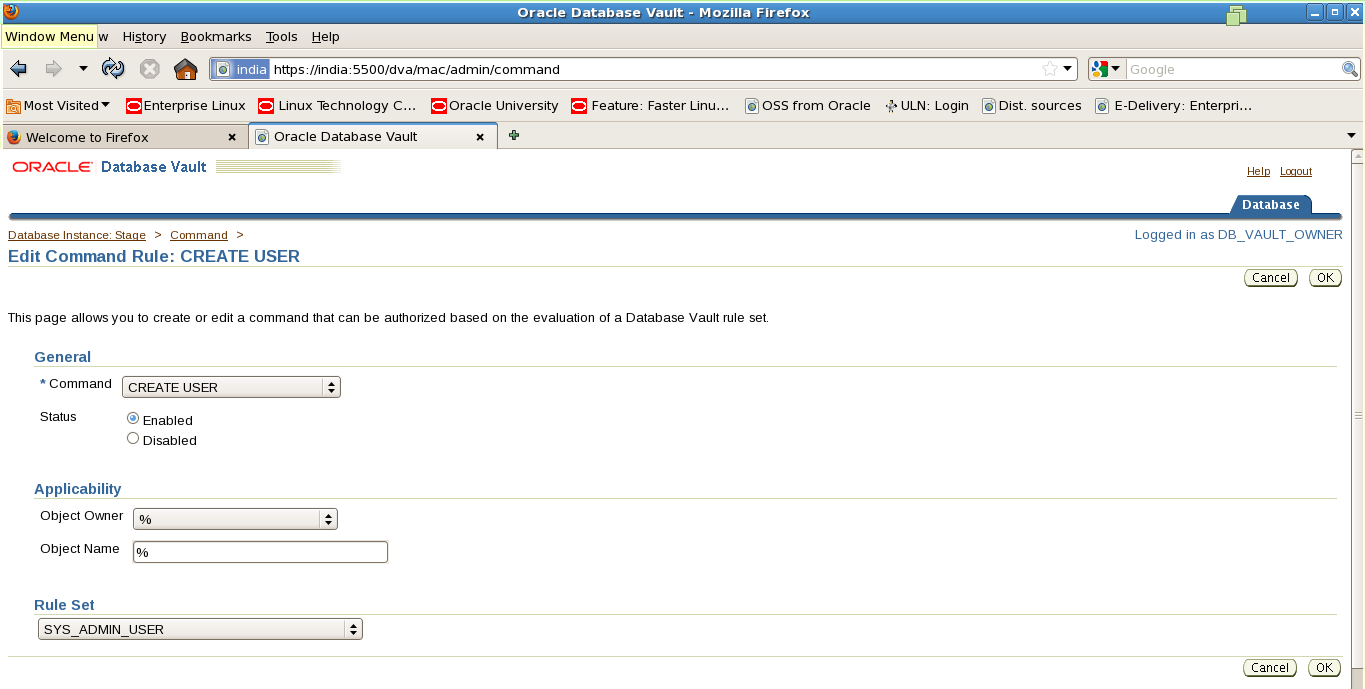
Go back to the home page, and click on “Command Rules”


Select the “CREATE USER” item and click on “Edit”


Leave the command as “CREATE USER”, and in the “RULE SET” drop-down choose “SYS_ADMIN_USER”


Click on OK

The SYS user can now create users in the database.


Oracle Database Vault - Part 7 ( Restrictions on SYS User Privileges)

on 9:36 AM

By enabling database vault it restrict the SYS user from performing some database administration task.


Oracle Database Vault - Part 6 ( Logging into the Database Vault Web Page )

on 9:14 AM


Oracle Database Vault - Part 5 ( Granting the required privileges )

on 9:09 AM


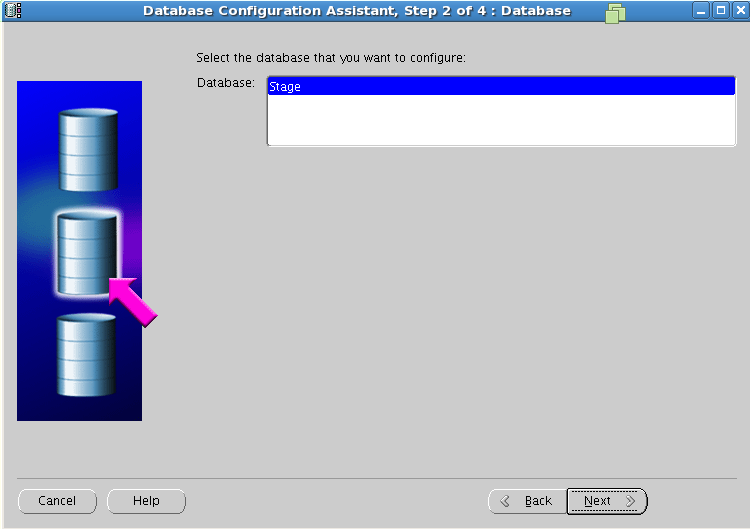
Oracle Database Vault - Part 4 ( Implementing Database Vault with DBCA )

on 9:06 AM